

TL;DR
Microsoft AI governance means deciding which tools employees may use, what information those tools may access, who reviews their work, and how costs and results are measured. Start with one useful workflow, check permissions, train a small group, and evaluate the complete task before expanding.
Microsoft AI governance belongs in the conversation before your business buys more licenses or connects an agent to company information. AI assistance is increasingly available alongside familiar work in email, documents, meetings, and collaboration. Easier access creates opportunities, but it does not establish ownership, appropriate permissions, or a reliable business process.
The practical question is how your team can use AI to improve a specific task while protecting information and keeping responsibility clear. For a small business, that starts with a manageable plan rather than a company-wide rollout.
What is Microsoft AI governance?
Microsoft AI governance is the set of business rules, responsibilities, and technical controls used to manage Microsoft AI tools and agents. It covers approved uses, information access, human review, spending, and ongoing oversight.
Governance can be simple. A 25-person business might begin with a short approved-tool policy, one process owner, a documented permission review, and a monthly check of usage and results. The important part is that people know who makes decisions and what boundaries apply.
An AI agent is software that uses AI to answer questions or carry out tasks using configured information and tools. Some agents only retrieve answers. Others can update records or take actions. The permissions and approval requirements should reflect what the agent can actually do.
Use PCC’s AI Governance Learning Center to organize the questions your business needs to resolve.
Does every Microsoft Copilot experience offer the same capabilities?
No. The Copilot name covers different experiences, and availability depends on licensing, application support, and your organization’s configuration. Seeing an AI button in an application does not establish which information it can access or whether every feature is included in your subscription.
Before choosing a license, describe the task. Does the employee need help rewriting an approved document, finding information across work files, or completing several steps through an agent? These are different requirements. Confirm the relevant capabilities and costs for the actual users and environment before purchase.
Microsoft’s product names and packaging can change. Here, “Microsoft Copilot” refers to Microsoft’s workplace AI offerings, including experiences your licenses or applications may still identify as Microsoft 365 Copilot. PCC’s article Which Microsoft Copilot Tool Fits Your Business? explains how to start with the task.
Why should permissions be reviewed before an AI rollout?
Copilot’s respect for permissions is an important protection, but it cannot determine whether your business granted the right permissions in the first place. A document shared with too many people remains available to those people.
Did You Know?
Microsoft states that Copilot surfaces organizational information the user already has permission to access. That makes an existing file-access review especially important before expanding AI use. Source: Microsoft’s data, privacy, and security documentation.
Imagine a construction company where an old SharePoint folder containing employee pay information is accessible to a broad staff group. AI does not have to bypass security for that access to create a problem. It may simply make existing information easier to find. This is an illustrative scenario, not a reported PCC client incident.
Before a pilot, have your IT administrator review the relevant SharePoint sites, Teams memberships, file-sharing links, and sensitive information. Remove unnecessary access and identify who owns the documents. A knowledge source should also be current: an outdated procedure can produce a well-written but incorrect answer.
Explore PCC’s Microsoft Copilot readiness guide before assigning broader access or additional licenses.
What should an AI-use policy cover?
A useful policy tells employees which tools and accounts are approved, what information they may submit, and when a person must review the result. Specify whether client records, financial information, personnel documents, and confidential project materials may be used, and under which conditions.
Microsoft provides enterprise data protection for covered workplace Copilot use, with controls depending on the subscription. That does not automatically extend the same terms to every personal account, external service, or third-party agent. Microsoft advises reviewing agents’ privacy statements and terms. Its documentation also distinguishes web-search data handling from workplace prompts and responses.
For a law firm, a sensible first use might be drafting an internal administrative checklist from approved material. Using confidential matter files calls for a separate review of access, applicable obligations, and tool configuration. Do not assume that a familiar product name resolves those questions.
Define an escalation route too. If someone receives an unexpected answer containing sensitive information or sees an agent take an unintended action, they should know whom to contact and how to pause the affected process. Read PCC’s AI Security for Small Business: Treat AI Agents Like Privileged Users for more on access and oversight.
How do licenses become useful business results?
Choose a recurring task with a clear input and a result someone can evaluate. Give the employee a practical example, explain the boundaries, and show how to check the output. General demonstrations are less useful than practicing the work the person actually performs.
For example, an office coordinator could use approved meeting notes to draft a follow-up email. A person would verify the names, dates, assigned actions, and commitments before sending it. The pilot should measure the entire process, including preparation, checking, and corrections.
Measure the finished task, not just the first draft.
A five-minute draft is not a five-minute task if it takes another twenty minutes to fix.
Track completion time, errors, omissions, and whether employees keep using the approach. If results are inconsistent, revise the source material, instructions, or workflow before adding users.
For a practice exercise, use PCC’s guide to drafting and summarizing email with Copilot in Outlook. For competing requests across departments, read How to Prioritize AI Projects in a Small Business.
How should a business control AI costs?
Separate recurring user-license costs from usage-based charges, implementation, training, and maintenance. Some agent scenarios use metered billing. Microsoft documents consumption billing for certain Copilot Chat agents that access SharePoint or connector content. Confirm the billing model for your specific scenario rather than assuming a user license includes every agent action.
Assign a budget owner, review who is using the licenses, and check any agent consumption. Establish who may enable paid features and what happens when spending rises. Verify whether the available controls provide notifications or actually restrict usage; a budget alert should not be treated as a guaranteed spending cap.
Measure value in operational terms. If an illustrative pilot reduces a recurring task from 30 minutes to 20 minutes, ten repetitions would free about 100 minutes. That is available capacity, not automatically cash savings. The business still needs to decide how that time will be used.
PCC’s AI & Business Automation services start with workflow fit, information access, licensing, and approval requirements. Any implementation and ongoing support are agreed separately.
A practical 30-day Microsoft AI governance pilot
The following is a suggested starting plan, not a Microsoft requirement. A workflow involving sensitive information or external actions may need more preparation.
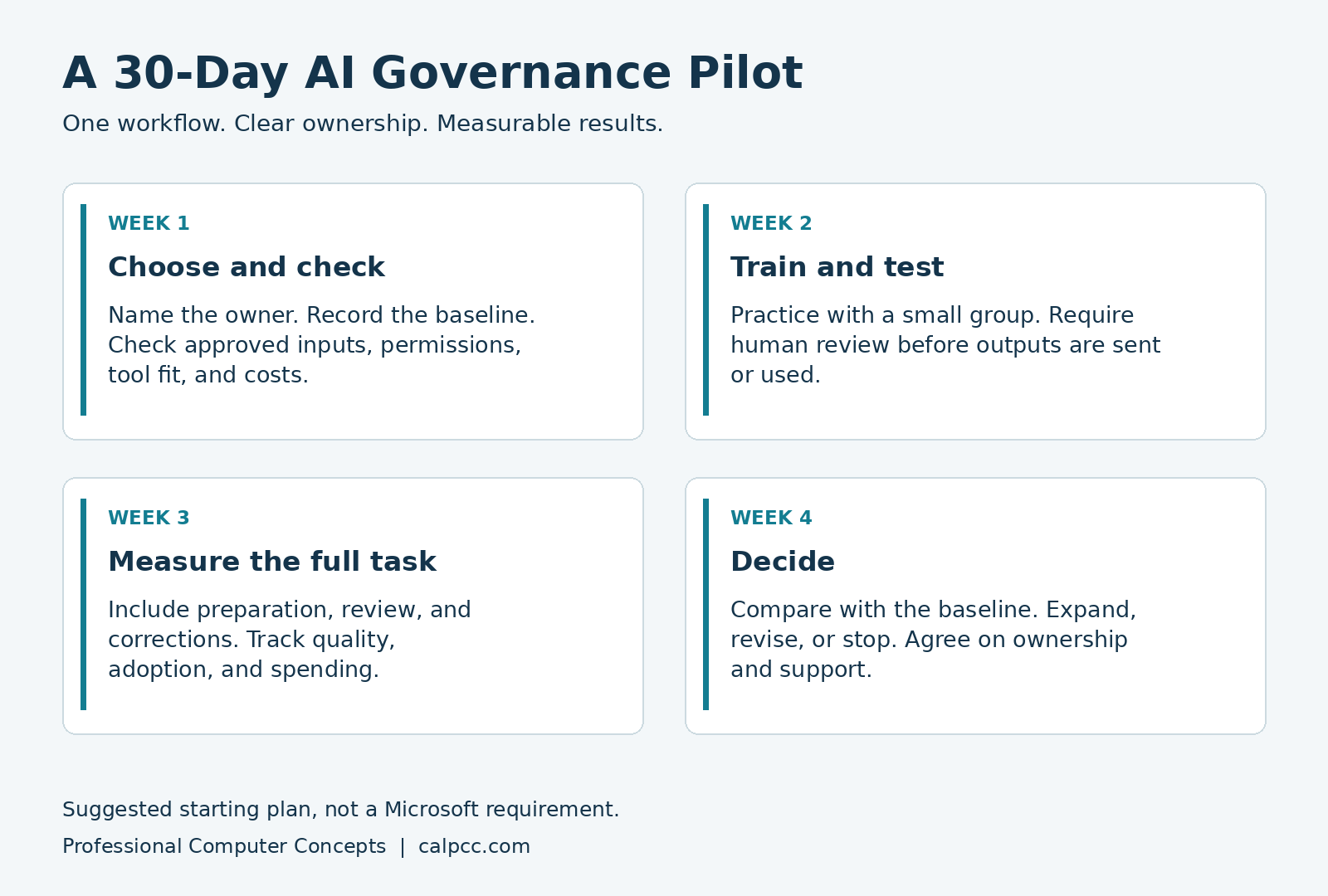
Begin by selecting one recurring task and naming its owner. Record current completion time and quality, then confirm approved inputs, permissions, tool fit, and costs. Train a small group, test the approach with approved information, and require human review before the output is used.
During the pilot, record preparation, drafting, review, corrections, and output quality. Check usage and spending. At the end, compare a representative sample with the baseline and decide whether to expand, revise, or stop. Confirm ownership, support, and a review date before broader use.
Write the expansion criteria before the pilot begins. For example, require a meaningful reduction in total task time without more errors, along with acceptable cost and consistent employee use. This keeps an impressive demonstration from becoming the only basis for the decision.
Bring PCC one recurring task
In a free 20-minute AI Workflow Review, we discuss how the task works today and recommend one practical next step. You receive a short written recap. A technical assessment or paid pilot is separately scoped.
Frequently asked questions
Do we need paid Copilot licenses for everyone?
No. Start with the workflow and confirm the capabilities each pilot user needs. Expand only when the results support additional investment.
Does Copilot fix overly broad file permissions?
No. Copilot uses existing access permissions for organizational information. Your administrator still needs to identify and correct inappropriate sharing.
Can an AI agent send messages or change records?
Some agents can, depending on their tools and configuration. Review the actions, permissions, and approval controls before enabling them. Start with a limited scope that you can test and supervise.
How should we measure AI return on investment?
Compare the full task before and after AI, including review and correction. Evaluate quality, actual usage, subscription and consumption costs, and how freed time is used.
Can PCC help us plan Microsoft AI adoption?
PCC helps assess workflow fit, information access, licensing, and approval requirements. Technical feasibility, implementation scope, and any ongoing support are agreed before paid work begins.
About Professional Computer Concepts
Professional Computer Concepts (PCC) is a trusted Managed IT and Cybersecurity provider serving the Bay Area for over 20 years. We help small and midsize businesses simplify their IT, strengthen security, and modernize operations. Explore our services: Managed IT Services, Cybersecurity, and Cloud Solutions.
Based in Novato, PCC works with Bay Area businesses that need practical technology decisions tied to how their teams operate.
From PCC’s Desk
The best first AI project is usually a task your team understands well enough to evaluate. Keep the scope small, check the result, and let the evidence guide your next decision. If your team has a recurring task worth examining, let’s talk about it.
Sources
Microsoft documentation reviewed October 6, 2026. Product names, capabilities, and billing can change.