
Free community resource
Online Scam Safety Guide
Straightforward help for recognizing suspicious calls, messages, and requests—and deciding what to do next.

Welcome—you’re in the right place
Why we created this guide
Calls, emails, text messages, and websites can be confusing—especially when they look as though they came from someone you know or an organization you trust. A scam is simply an attempt to persuade you to send money, share private information, or give someone access to an account or device.
Professional Computer Concepts created this page to give our community one calm, easy-to-understand place to learn what to watch for and what to do. It is for anyone who wants practical help, whether you use technology every day or only when you need it.
Being targeted is not your fault, and asking someone to help you check a request is always a smart decision. You do not need to understand every new scam. You only need a few dependable habits that give you time to stop and check.
The safest response: Stop. Leave. Verify.
- Stop. Do not send money, share a code, or provide personal information.
- Leave the conversation. Hang up, close the message, or end the chat. You are not being rude.
- Verify independently. Contact the person or organization using a number, website, or app you already trust—not the contact information in the message.
If someone is pressuring you to act immediately, pause. A legitimate organization will give you time to verify what is happening.
Warning signs of a scam
Be cautious when someone unexpectedly:
- Demands immediate action or tells you not to speak with anyone
- Says your account, computer, Social Security number, or benefits are in danger
- Claims a loved one is in trouble and needs money urgently
- Asks for payment by gift card, cryptocurrency, wire transfer, cash, or payment app
- Requests a password, PIN, verification code, or full Social Security number
- Wants remote access to your computer or phone
- Promises a prize, investment return, refund, job, or romance that seems unusually favorable
- Says you must move money to a “safe” or “protected” account
- Uses threats of arrest, deportation, account closure, or financial loss
- Sends a link or phone number and insists you use it immediately
Remember: Scammers can fake caller ID, email addresses, websites, voices, and images. A familiar name or convincing voice is not proof.
Common scams
Bank or government impersonation
Someone claims there is fraud on your account, that you owe money, or that your identity was used in a crime.
What to do: Hang up. Call the bank using the number on your card, or find the agency through its official website.
Tech-support scams
A pop-up, email, text, or caller claims your computer has a virus or a subscription renewed.
What to do: Do not call the number or install anything. Close the page. Never give an unexpected caller remote access.
Family-emergency scams
Someone pretends to be a relative, friend, police officer, lawyer, or medical worker. Artificial intelligence can imitate a voice.
What to do: End the call and contact your family member directly. Use a private family verification phrase.
Romance and friendship scams
A person builds trust over time, then asks for money because of an emergency, travel problem, investment, or frozen account.
What to do: Do not send money. Discuss the situation with someone you trust.
Investment and cryptocurrency scams
Someone promises guaranteed returns, shows a fake balance, or demands more fees before you can withdraw money.
What to do: Do not move money or buy cryptocurrency at the direction of an unexpected caller.
Fake invoices and alerts
A message claims you made a purchase, missed a delivery, owe a toll, or need to reset an account.
What to do: Do not use its link or number. Open the company’s official app or type its known website yourself.
Five protections to set up now
1. Use different passwords for important accounts
If one password is stolen, a different password on every account limits the damage. A reputable password manager can create and remember strong passwords for you.
2. Turn on multifactor authentication
This adds another check when someone signs in. Use an authenticator app or security key when available. Never share a verification code with someone who contacted you.
3. Turn on financial alerts
Ask your bank and credit-card companies to notify you about purchases, transfers, password changes, and new sign-ins. Review statements regularly.
4. Keep devices updated
Install updates for your phone, computer, browser, and apps. Turn on automatic updates when possible.
5. Make a verification plan
Choose one or two trusted people you can contact before sending money or sharing sensitive information. Agree that asking for a second opinion is always welcome.
Free printable resource
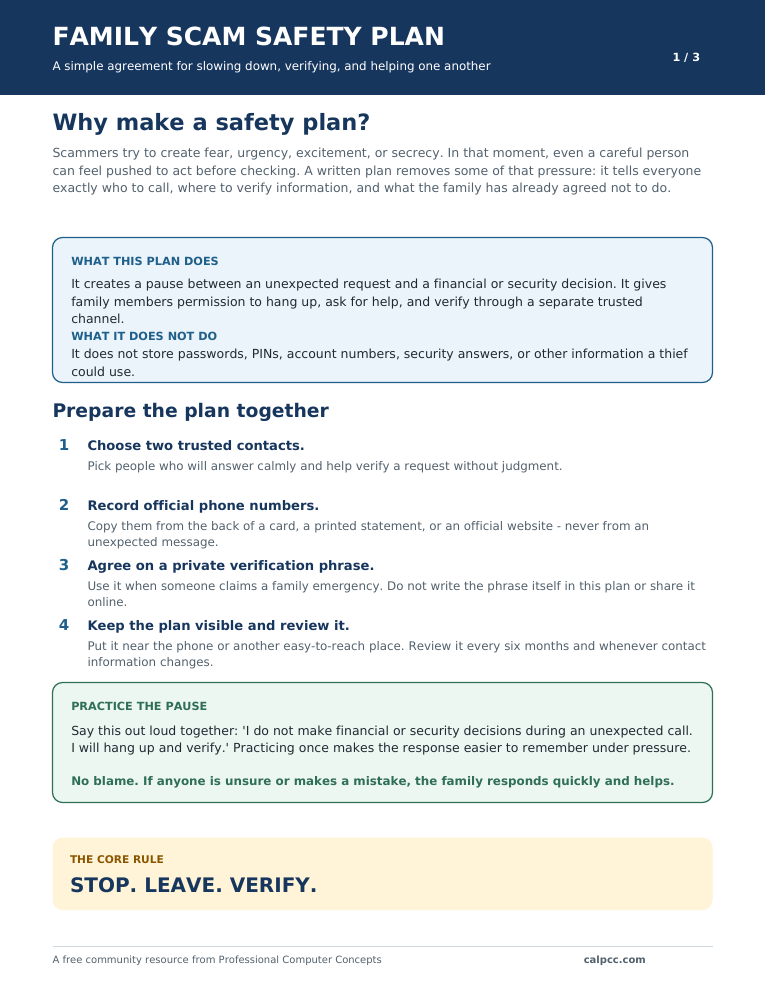
Make a Family Scam Safety Plan
Scams are harder to evaluate when someone is creating fear or urgency. This three-page plan helps families decide what to do before that pressure begins.
- Understand why a written plan helps
- Follow clear “If this happens, do this” instructions
- Record trusted contacts and official support numbers
- Agree on a verification process and shared family rules
Descargar el Plan Familiar en Español
PDF, three pages, designed for standard US Letter paper. No email or registration required.
Free safety library
Print, practice, and prepare
Choose the resource that fits the situation. Every download is free, printable, and available without providing an email address.
Stop. Leave. Verify. Quick Card
Large-print instructions to keep beside the phone or somewhere easy to see.
Could This Be a Scam?
Eight warning-sign questions to use before responding, paying, clicking, or sharing.
After a Scam: Act Now
Recovery steps organized by money, passwords, remote access, and identity information.
How to Talk About Scam Safety
A dignity-first guide for offering help without embarrassing or taking control away from someone.
Scam Practice Scenarios
Five realistic situations to discuss together, followed by a separate answer key.
Secure Your Accounts
Practical protections for email, banking, credit cards, phones, devices, and passwords.
If you may have been scammed, act now
Speed matters, but panic does not help. Take these steps:
- Contact the bank, card issuer, payment service, gift-card company, or wire-transfer company immediately. Report fraud and ask whether the payment can be stopped or reversed.
- If someone had remote access, disconnect the device from the internet. Do not use it for banking or password changes until it has been checked.
- Change affected passwords from a device you believe is safe. Start with email, financial accounts, and your mobile-phone account. Turn on multifactor authentication.
- Contact the real organization directly if an account may be compromised.
- Save evidence. Keep messages, receipts, phone numbers, account details, and screenshots. Stop communicating with the scammer.
- Report the incident using the trusted resources below.
- Watch for recovery scams. Someone demanding an upfront payment to recover lost money may be attempting a second scam.
Do not hide what happened out of embarrassment. Scammers deliberately manipulate normal human emotions, and fast action can limit the damage.
Trusted places to get help
- Money sent or account affected: Contact your bank or payment provider first using a known number.
- Report fraud: ReportFraud.ftc.gov
- Identity-theft recovery plan: IdentityTheft.gov
- Report internet-enabled crime to the FBI: IC3.gov
- Help for adults age 60 and older filing an IC3 complaint: National Elder Fraud Hotline, 833-372-8311, Monday–Friday, 10 a.m.–6 p.m. Eastern Time
- Immediate physical danger or threats: Call 911 or local law enforcement.
Government agencies will not charge you to file a fraud report or recovery plan.
A simple family safety agreement
- We will never criticize someone for stopping to ask whether a message is real.
- We will verify urgent requests through a separate, trusted method.
- We will not send money or share verification codes under pressure.
- We will tell one another quickly if something goes wrong.
- We will use a private phrase to verify unusual family-emergency requests.
The goal is not to become suspicious of everything. It is to slow down when someone else is trying to control the pace.