
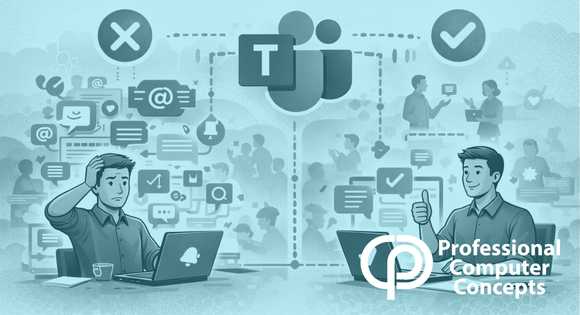
TL;DR Microsoft Teams etiquette helps keep communication clear, reduces unnecessary notifications, and improves overall productivity. Small changes in how you use Teams can make a big difference in how your team works together.
Microsoft Teams etiquette plays a critical role in how effectively your team communicates and collaborates. Microsoft Teams is a powerful tool, but like any shared workspace, how people use it determines whether it improves productivity or creates noise.
Without clear Microsoft Teams etiquette, chats become cluttered, notifications feel constant, and meetings lose focus. Following a few simple do’s and don’ts helps keep Teams professional, productive, and easier for everyone to use.
To explore more productivity tips, check out our guide on Hidden Gems in Microsoft Teams You Probably Don’t Know About.
Do: Keep Messages Clear and Concise
Clear communication is a core part of Microsoft Teams etiquette. Long, rambling messages are harder to follow and slow down conversations.
Keep your chats focused by making your point quickly. If you need to cover multiple topics, break them into separate messages or use short bullet points. This makes it easier for coworkers to respond without confusion.
💡 Challenge: Try breaking your next long chat into two or three short, clear messages instead of one large block of text.
Don’t: Overuse @Mentions
Proper Microsoft Teams etiquette means using @mentions intentionally.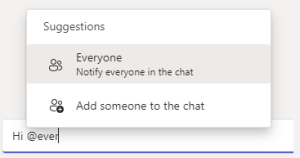
Tagging someone is useful when you need their attention, but overusing it creates unnecessary noise. Avoid tagging entire teams unless the message truly applies to everyone. This keeps notifications meaningful and reduces alert fatigue.
💡 Tip: Only @mention when you need input or action, not for general updates.
Do: Use Reactions Instead of Extra Messages
One of the simplest Microsoft Teams etiquette habits is using reactions instead of sending extra messages.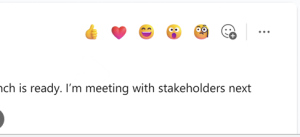
A thumbs-up or checkmark often communicates agreement better than replying with “OK” or “Got it.” This keeps chats cleaner and reduces unnecessary notifications for others.
💡 Challenge: Next time you agree with a comment, react instead of replying.
Don’t: Interrupt Meetings with Side Conversations
Good Microsoft Teams etiquette extends to meetings as well.
Side conversations in chat or talking over others can quickly derail a meeting. Keep notes for later or suggest adding important topics to the agenda so the conversation stays focused.
💡 Tip: If something comes up off topic, write it down and bring it up after the meeting.
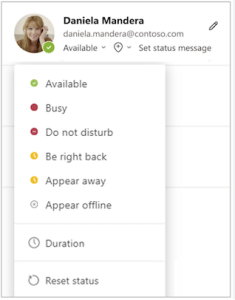
Do: Respect Status and Availability
Respecting availability is an important part of Microsoft Teams etiquette.
If someone is marked as “Busy” or “Do Not Disturb,” avoid sending non-urgent messages. Status indicators exist to help people protect focus time.
💡 Challenge: Before sending your next message, check the recipient’s status and decide if it can wait.
Did You Know? Microsoft Teams features like status indicators and reactions were designed to reduce interruptions. Following Microsoft Teams etiquette helps teams stay focused and collaborate more effectively.
Why Microsoft Teams Etiquette Matters
Microsoft Teams etiquette is not just about being polite. It directly impacts productivity.
When communication is clear and intentional:
- Teams spend less time sorting through messages
- Meetings stay on track
- Notifications feel manageable instead of overwhelming
Small changes in behavior lead to measurable improvements in how work gets done.
Related Reading
Read more in Hidden Gems in Microsoft Teams You Probably Don’t Know About
Learn how to reduce noise in 5 Ways to Use Teams Chat Without Cluttering Your Inbox
Explore more productivity strategies in our Microsoft 365 resources
About Professional Computer Concepts
Professional Computer Concepts (PCC) is a trusted Managed IT and Cybersecurity provider serving the Bay Area for over 20 years. We help small and midsize businesses simplify their IT, strengthen security, and modernize operations. Explore our services:
Managed IT Services | Cybersecurity | Cloud Solutions
From PCC’s Desk
Tools like Microsoft Teams are only as effective as the habits behind them.
Microsoft Teams etiquette may seem like a small detail, but it shapes how your team communicates every day. When used well, it creates clarity. When ignored, it creates friction.
If you want to make Teams a more effective part of your workplace, let’s talk.