

TL;DR Copilot Cowork is a new Microsoft 365 Copilot capability that can complete longer, multi-step work across Microsoft 365. For businesses, the opportunity is real, but so are the questions around licensing, permissions, security, cost, and oversight.
On June 16, 2026, Microsoft announced the general availability of Copilot Cowork, a Microsoft 365 capability designed to do more than answer questions or draft content. According to Microsoft, Cowork can work through complex, long-running, multi-step tasks across Microsoft 365 and return a completed result, not just a recommendation or rough draft.
That makes this launch important for a simple reason: it signals a shift in how AI is being used at work. Until now, most business AI tools have acted like assistants. They summarize meetings, draft emails, answer questions, or help brainstorm. Copilot Cowork moves closer to delegated work, where a user defines the outcome and the AI works across Microsoft 365 to help complete the task.
For small and midsized businesses, this is worth watching closely. Copilot Cowork may create real productivity gains, but it should not be turned on without reviewing permissions, data access, cost controls, and approved use cases.
What Is Copilot Cowork?
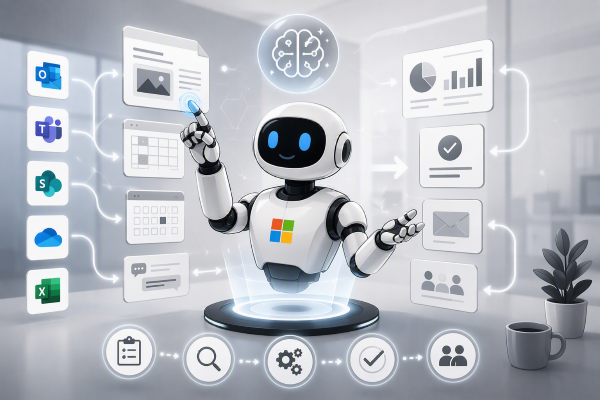
Copilot Cowork is a delegated work experience inside Microsoft 365 Copilot. Instead of giving AI a narrow prompt and receiving a single response, a user gives Cowork a broader outcome to complete. Cowork can then create a plan, use Microsoft 365 context, work across tools, and continue the task until it has a useful result to return.
In plain English, Copilot Cowork is less like a chatbot and more like a digital teammate for certain types of office work. It can use context from Microsoft 365 apps such as Outlook, Teams, Word, Excel, and SharePoint to help complete tasks that involve multiple steps.
That does not mean businesses should treat it like an unsupervised employee. Copilot Cowork still depends on the information, permissions, and structure inside the Microsoft 365 environment. If the environment is messy, the results and risks may be messy too.
For related reading, explore PCC’s guidance on Microsoft 365 support and AI readiness for small businesses.
The Industry Is Already Calling This a New Way to Work
Across the industry, Copilot Cowork is being described not as another AI feature, but as a new way of working altogether. The idea is simple but powerful: instead of asking AI for help, you assign it work. From there, it plans, executes, and delivers—functioning more like a teammate than a tool.
Early commentary around the release consistently highlights this shift from prompt-and-response AI to delegated, outcome-driven work (as discussed in this industry breakdown on Copilot Cowork). Rather than generating drafts or suggestions, Cowork is designed to carry tasks across multiple systems, coordinate workflows, and return meaningful results with minimal oversight.
This aligns closely with what we’re seeing from Microsoft: a move toward AI that doesn’t just assist, but actively participates in getting work done.
Why This Announcement Matters
This is not just another Microsoft feature release. Copilot Cowork shows where business AI is heading. The focus is shifting from simple content generation to workflow execution.
That matters because many businesses do not just need help writing faster. They need help reducing repetitive work, cleaning up bottlenecks, reviewing information, coordinating follow-up, and making better use of the data already sitting inside Microsoft 365.
Microsoft has described Cowork as useful for long-running, multi-tool work. That phrase matters. A typical business workflow may involve several emails, shared files, spreadsheet updates, Teams messages, meeting notes, and follow-up actions. Cowork is designed for that kind of work, not just one-off prompts.
What Makes Copilot Cowork Different from Traditional Copilot?
Traditional Microsoft 365 Copilot helps users work faster by summarizing, drafting, searching, and answering questions with business context. Copilot Cowork goes further by helping turn a request into a plan of action.
For example, a traditional Copilot prompt might ask:
“What were the key points from this meeting?”
A Copilot Cowork task might be closer to:
“Review the meeting notes, compare them with the project files, identify missing follow-up items, draft the next steps, and prepare a status update.”
That difference is significant. It changes AI from a response tool into a workflow tool.
Copilot Cowork also brings a stronger need for governance. If AI can work across files, messages, and business systems, then the quality of the underlying Microsoft 365 setup matters more than ever.
 Before You Turn On Copilot Cowork, Check Your Permissions
This is the section businesses should not skip.
AI tools do not magically fix poor permissions. They often expose them.
If employees have access to too many SharePoint sites, Teams channels, OneDrive folders, or old files, AI tools may be able to surface information those employees technically have access to, even if they should not. That can create uncomfortable security, privacy, and compliance problems.
Before rolling out Copilot Cowork, businesses should review:
- Who has access to sensitive files
- Which Teams and SharePoint sites contain confidential information
- Whether old users, vendors, or guests still have access
- Whether data is labeled or organized clearly
- Whether employees understand what AI tools can and cannot be used for
- Whether cost controls are in place for usage-based billing
This is not a reason to avoid AI. It is a reason to prepare for it properly.
Read more in PCC’s related articles on cybersecurity governance, Microsoft 365 security, and managed IT services for small businesses.
Why Copilot Cowork Matters for Small and Midsized Businesses
For many small and midsized businesses, productivity problems are not dramatic. They are quiet and constant.
Someone spends too much time chasing updates.
A manager manually compares spreadsheets.
A project coordinator searches through emails to find the latest version of a document.
A business owner loses time preparing status summaries.
A team misses follow-up tasks because information is spread across too many places.
Copilot Cowork may help reduce some of that friction. The benefit is not just “AI writes faster.” The bigger value is that AI may help connect work across systems that employees already use every day.
This could matter for law firms, construction companies, nonprofits, professional services firms, and other Bay Area businesses that rely heavily on email, documents, meetings, and project coordination.
For example, a construction company might use Microsoft 365 across bids, schedules, project documents, vendor emails, and meeting notes. A tool like Cowork could eventually help organize follow-up items, compare documents, or prepare summaries. But that only works safely if permissions, file structure, and user training are in good shape first.
What IT Leaders Should Pay Attention To
The excitement around Copilot Cowork comes with practical considerations. Microsoft says Cowork requires a Microsoft 365 Copilot license, and usage is billed separately through Copilot Credits. Microsoft also provides administrative controls for managing access and cost.
That means Copilot Cowork is not just a feature decision. It is an IT strategy decision.
Before enabling it broadly, businesses should think through:
- Which users actually need it
- Which business processes are good candidates
- How usage and cost will be monitored
- What data Cowork can access
- What actions require human approval
- How employees will be trained
- What success looks like after rollout
A rushed rollout can create confusion, unnecessary cost, and avoidable risk. A measured rollout can help the business learn where AI creates real value.
Did You Know?
FAQ
What is Copilot Cowork?
Copilot Cowork is a Microsoft 365 Copilot capability that helps complete longer, multi-step tasks across Microsoft 365. It is designed to support delegated work, not just answer questions or draft content.
Is Copilot Cowork the same as Microsoft 365 Copilot?
No. Microsoft 365 Copilot is the broader AI assistant experience across Microsoft 365. Copilot Cowork is a newer capability within that ecosystem focused on longer-running, multi-tool work.
Does Copilot Cowork replace employees?
No. Copilot Cowork is designed to assist with certain types of digital work. Businesses still need employees to review results, make decisions, approve sensitive actions, and manage business context.
Should small businesses turn on Copilot Cowork right away?
Not automatically. Small businesses should first review licensing, permissions, sensitive data access, employee training, and cost controls. The best rollout starts with a few clear use cases.
What is the biggest risk with Copilot Cowork?
One of the biggest risks is poor data governance. If Microsoft 365 permissions are too broad, AI tools may surface information users technically can access but should not normally see.
About Professional Computer Concepts
Professional Computer Concepts helps Bay Area businesses make practical technology decisions without getting buried in complexity. As a managed IT and cybersecurity provider, PCC supports Microsoft 365 environments, cloud services, security planning, user support, and long-term IT strategy. Our role is to help businesses understand what new tools like Copilot Cowork can do, where the risks are, and how to adopt technology in a way that supports real operations.
Explore our services:
Managed IT Services | Cybersecurity | Cloud Solutions | Microsoft 365 Resources
Final Thoughts
Copilot Cowork is one of the clearest signs yet that workplace AI is moving into a new phase. Microsoft is no longer positioning AI only as a tool that helps people write, summarize, or search faster. With Cowork, the focus is shifting toward delegated work and completed outcomes.
For businesses, that is exciting, but it also raises serious questions about process, security, licensing, cost, and oversight. The companies that benefit most will likely be the ones that approach tools like Cowork with structure, not impulse.
Curious whether Microsoft 365 Copilot or Copilot Cowork is a good fit for your business? Professional Computer Concepts can help you review licensing, permissions, security, and practical use cases before you roll it out. Contact us to start an AI readiness conversation.