
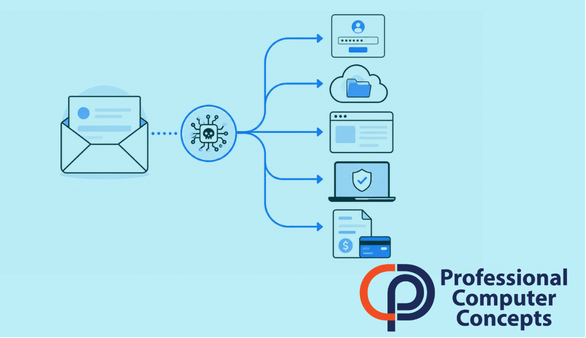
TL;DR The AI attack path evolution means cyberattacks are no longer limited to suspicious emails. The inbox may still be the starting point, but attackers can now use AI-assisted tools to move faster through identities, cloud apps, browser sessions, files, payment workflows, and endpoints.
The AI Attack Path Evolution: Why Businesses Need to Look Beyond Email
The AI attack path evolution is changing how small and midsize businesses need to think about cybersecurity. For years, many business owners were taught to focus heavily on phishing emails. That advice was not wrong. Email is still one of the most common ways attackers reach employees.
But the inbox is now only one piece of the attack path.
AI-assisted attacks are making it easier for cybercriminals to research companies, personalize messages, automate phishing campaigns, test stolen credentials, and move quickly once they gain access. Microsoft’s 2025 Digital Defense Report notes that threat actors have developed techniques ranging from AI-automated phishing to multi-stage attack chains, while also exploiting known gaps in web assets and remote services at a faster pace.
For small businesses, the practical lesson is simple: email filtering matters, but it is not enough by itself.
What Is the AI Attack Path Evolution?
The AI attack path evolution describes the way cyberattacks are expanding from single-entry scams into faster, more connected sequences of activity.
An attack path is the route an attacker takes to get from the first point of contact to the final goal. That goal might be stealing money, accessing sensitive files, taking over a Microsoft 365 account, deploying ransomware, or redirecting payments.
In the past, a phishing email might have been the main event. An employee clicked a bad link, entered a password, and the attacker tried to use those credentials.
Now, AI can help attackers improve several stages of the process. It can help write more believable messages, generate variations of phishing lures, summarize public information about a company, mimic vendor communication, and support automated workflows. Axios reported that Huntress researchers observed a 1,380% increase in device-code phishing attacks in the first four months of 2026 compared with the second half of 2025, with phishing-as-a-service platforms packaging identity theft infrastructure, phishing kits, and AI-powered workflows for criminals.
That is the bigger issue. AI is not only making fake emails sound better. It is helping attackers scale the whole process.
Why the Inbox Still Matters
Email is still one of the most important places to defend because it is where people make daily business decisions.
Employees approve invoices, review attachments, reset passwords, receive vendor updates, and communicate with clients through email. That makes the inbox a natural starting point for phishing, business email compromise, fake file-sharing alerts, and payment fraud.
A convincing message can still cause damage. A fake Microsoft 365 login page can capture credentials. A fraudulent vendor email can redirect a payment. A malicious attachment can create an endpoint compromise. A fake browser update can send the user into a malware delivery chain.
This is why employee training and email security still matter. Businesses should continue teaching staff to slow down, verify requests, report suspicious messages, and question unusual financial or login prompts.
But stopping there creates a false sense of security.
Where AI-Assisted Attacks Go After the Inbox
Once an attacker gets a foothold, the next move is often identity.
A stolen password, session token, or approved login can give an attacker access to email, Teams, SharePoint, OneDrive, or other cloud systems. From there, they may read internal conversations, search for invoices, identify clients, review file names, or find people with financial authority.
This is where the attack becomes more dangerous. The attacker no longer needs to guess. They can use real internal information.
For example, an attacker who gains access to a mailbox may study how a company talks to vendors. They may find an active invoice thread and insert new payment instructions. They may monitor messages quietly until the right opportunity appears. They may use compromised accounts to send phishing messages to clients or coworkers because messages from a real account are harder to detect.
The attack path can also move through browsers and websites. Recent warnings about traffic distribution systems show how users can be pushed through redirect chains that evaluate their device, browser, operating system, and location before delivering phishing pages, scams, or malware. That means web filtering and endpoint protection are part of the same conversation as email security.
Why Small Businesses Are Exposed
Small businesses often assume attackers are mainly targeting large enterprises. That assumption is risky.
Small businesses usually have valuable data, active payment workflows, Microsoft 365 accounts, client relationships, and limited internal security staff. They may also rely on a few trusted employees who approve invoices, manage payroll, or communicate with vendors. If one of those accounts is compromised, the business impact can be immediate.
Verizon’s 2026 Data Breach Investigations Report states that 31% of breaches now start with software vulnerabilities, surpassing stolen passwords as the top entry point. The same report also says generative AI is bolstering different attack techniques, helping threat actors work faster across stages such as spotting gaps and writing malware.
That should get every business owner’s attention. The risk is no longer limited to whether someone clicks a bad email. It also includes whether systems are patched, whether cloud accounts are monitored, whether endpoints are protected, and whether access is limited properly.
What Businesses Should Do Now
The right response is not panic. It is layered security.
Email filtering should be part of the defense, but businesses also need stronger identity protection. That includes multifactor authentication, conditional access policies, strong password practices, and ideally phishing-resistant authentication where appropriate.
Microsoft 365 monitoring is also important. Businesses need visibility into suspicious login attempts, unusual forwarding rules, impossible travel alerts, risky app consent, mailbox access changes, and abnormal file activity.
Endpoint protection matters because attacks often move from the user to the device. A strong endpoint detection and response tool can help identify suspicious behavior after a click happens.
Web filtering and DNS protection help reduce exposure to malicious websites, fake login pages, and redirect chains. This connects directly to the risks discussed in PCC’s upcoming article on traffic distribution system attacks and the related post on web filtering for small business.
Access control is another major piece. The principle of least privilege means users should only have the access they need to do their jobs. This limits how far an attacker can move if one account is compromised. Read more in PCC’s guide on the principle of least privilege.
Did You Know?
IBM’s 2025 Cost of a Data Breach Report found that the global average cost of a data breach was $4.4 million. IBM also reported that 63% of organizations lacked AI governance policies to manage AI or prevent the spread of shadow AI.
How PCC Helps Reduce the Attack Path
Professional Computer Concepts helps businesses think beyond individual tools and look at the full path an attacker might take.
That includes protecting email, securing Microsoft 365, monitoring endpoints, strengthening identity controls, improving backup and recovery, applying web filtering, and helping employees understand what modern attacks look like.
For Bay Area small businesses, the goal is not to create unnecessary complexity. The goal is to make it harder for attackers to move from one weak point to another.
A good cybersecurity strategy should answer practical questions:
- Can an attacker log in if they steal a password?
- Can they access sensitive files if they compromise one account?
- Can they redirect payments without a second verification step?
- Can your team detect suspicious mailbox activity?
- Can your systems recover if ransomware is involved?
Those answers matter more than any single security product.
FAQ
What does AI attack path evolution mean?
AI attack path evolution means cyberattacks are becoming faster, more automated, and more connected. Attackers may start with email, but they can quickly move into cloud accounts, files, browser sessions, endpoints, and payment workflows.
Is phishing still the main risk?
Phishing is still a major risk, but it is no longer the only concern. Businesses also need to protect identities, devices, web traffic, cloud apps, and sensitive data.
Does multifactor authentication still help?
Yes. Multifactor authentication helps, but it is not a complete solution. Some attacks now target session tokens, device-code authentication, or user approval fatigue. MFA should be combined with monitoring, conditional access, and employee training.
What should small businesses prioritize first?
Start with strong email security, MFA, endpoint protection, Microsoft 365 monitoring, backups, patching, and web filtering. Then review user permissions and remove unnecessary access.
How can PCC help with AI-assisted cyber risk?
PCC helps small and midsize businesses reduce cyber risk through managed IT, cybersecurity services, Microsoft 365 security, endpoint protection, web filtering, backup, monitoring, and practical user education.
Related Reading
Read more in PCC’s upcoming article on Traffic Distribution System Attacks.
Learn how Web Filtering for Small Business can help reduce exposure to malicious websites and redirect chains.
Explore PCC’s guide on The Principle of Least Privilege to understand why access control matters.
You may also want to link this post to PCC’s pages for Cybersecurity, Managed IT Services, and Microsoft 365 Support.
About Professional Computer Concepts
Professional Computer Concepts (PCC) is a trusted Managed IT and Cybersecurity provider serving the Bay Area for over 20 years. We help small and midsize businesses simplify their IT, strengthen security, and modernize operations. Explore our services:
Managed IT Services | Cybersecurity | Cloud Solutions
From PCC’s Desk
The inbox still matters, but it is no longer enough to protect email and assume the business is safe. Modern attacks move across accounts, apps, devices, and data. The businesses that are better prepared are the ones that look at the full path, not just the first click.
If you are ready to strengthen your cybersecurity beyond the inbox, let’s talk.