
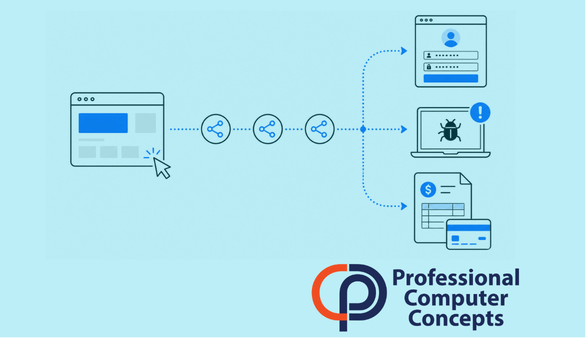
TL;DR Traffic distribution system attacks use redirect chains to send users from emails, ads, search results, apps, or compromised websites to phishing pages, scams, or malware. Bay Area businesses should treat this as more than a web-browsing issue because these attacks can lead to credential theft, financial fraud, ransomware access, and compromised business accounts.
Traffic Distribution System Attacks Are a Business Risk, Not Just a Browser Problem
Traffic distribution system attacks are becoming a more important cybersecurity issue for small and midsize businesses. The FBI recently warned that cybercriminals are using traffic distribution systems, also known as TDSs, to gain access to victim networks for ransomware or other financial scams.
A traffic distribution system is technology used to route website visitors to different destinations. In legitimate marketing, this type of routing can be used to send users to different pages based on location, device, browser, or campaign source.
Criminals abuse that same idea.
Instead of sending users to helpful or relevant pages, malicious TDS activity can send them through a chain of redirects that eventually lands on a phishing page, fake login screen, fraudulent promotion, fake software update, or malware download.
For business owners, the practical lesson is simple: a bad link is not always obvious at the first click. A user may start on a legitimate-looking site, advertisement, or search result and still end up somewhere dangerous.
What Are Traffic Distribution System Attacks?
Traffic distribution system attacks occur when criminals use redirect technology to control where users go after clicking a link, visiting a webpage, clicking an ad, signing up for a promotion, or downloading an application.
The danger is that the user may not see the full path. One click can move through several intermediate websites before landing on the final destination. That final destination may change depending on the user’s device, browser, location, operating system, IP address, or other information.
This makes the attack harder to detect.
A security researcher may see a harmless page. A business employee may see a fake Microsoft 365 login page. A user in one region may see a scam offer, while another user may be sent to a malware download. This selective behavior helps criminals avoid detection and target users more effectively.
In plain English, the attacker is not just sending everyone to the same bad website. They are sorting visitors first, then deciding who should receive the malicious content.
How Do Malicious Redirects Work?
The FBI describes several ways criminals drive users into a malicious traffic distribution system. These can include phishing emails, search engine poisoning, fraudulent advertisements, compromised websites, and altered website code.
Search engine poisoning means criminals manipulate search results or advertisements so malicious pages appear to look legitimate. A user may search for a software download, vendor portal, invoice payment page, or business service and click what appears to be a normal result.
Compromised websites are another concern. A legitimate business website can become part of the attack if criminals gain access to the site’s administrative panel, outdated plugins, themes, or hosting environment. Once inside, they can alter code so visitors are silently redirected through a malicious chain.
This is why website maintenance matters. Outdated plugins, weak admin passwords, unused accounts, and poorly secured hosting access can turn a normal website into part of someone else’s attack infrastructure.
Why Should Small Businesses Care?
Small businesses should care because these attacks can connect directly to common business losses.
A traffic distribution system attack can lead to credential theft if an employee is redirected to a fake login page. It can lead to financial fraud if the user lands on a fake payment portal or scam page. It can lead to malware if the user is prompted to download a fake browser update, fake PDF viewer, fake security tool, or fake business application.
It can also become part of a ransomware path. If malware gives attackers access to a business system, that access may be used directly or sold to other criminals, including ransomware groups.
The risk is not limited to large companies. A small law firm, construction company, manufacturer, nonprofit, or local professional services firm may still have valuable email accounts, payment workflows, client data, and cloud files. That makes the business useful to criminals.
The bigger issue is that these attacks often do not look dramatic at first. They may start with something ordinary: a search result, a vendor link, a promotion, an ad, a plugin update, or a login prompt.
Why Traditional Firewalls May Not Be Enough
Many businesses assume a firewall will block malicious websites. Firewalls are still important, but malicious traffic distribution systems are designed to make blocking harder.
The FBI warned that criminals may use complex chains of intermediate nodes to hide the final malicious destination. That means the first site a user visits may not be the final dangerous site. The destination may also change based on who is visiting.
This is one reason businesses need layered protection. A firewall is one layer. It should be supported by DNS filtering, web filtering, endpoint protection, browser security, email security, patching, user awareness training, and monitoring.
No single tool catches everything.
The goal is to reduce the chance that one click becomes a business-wide incident.
What Should Businesses Do to Reduce Risk?
Start with employee awareness. Staff should know that malicious redirects can begin from emails, ads, search results, compromised websites, and fake software prompts. They should be cautious with sponsored search results, unexpected downloads, unusual login prompts, and “update required” messages.
Next, improve web and DNS filtering. Web filtering can help block access to known malicious domains, suspicious categories, and risky destinations before the user reaches the final page. This is especially useful when attackers use redirect chains to move users toward phishing or malware.
Endpoint monitoring is also important. The FBI specifically recommends monitoring endpoints for suspicious execution of tools such as wscript.exe, cscript.exe, and PowerShell scripts that invoke web requests for suspicious files, including JavaScript, PowerShell, or SVG files.
Patch management matters too. Businesses should keep systems, browsers, plugins, and website platforms updated. Website owners should also patch content management systems, themes, plugins, databases, FTP accounts, and hosting administration access.
Account security should not be overlooked. Strong passwords, unique passwords, multifactor authentication, and limited login attempts help reduce the chance that criminals can take over website administration accounts or business systems.
What Website Owners Should Check
If your business has a website, do not assume this only applies to users browsing the internet. Your own website can become part of an attack chain if it is not maintained.
Businesses should review who has access to the website, whether old admin accounts still exist, whether plugins and themes are current, and whether hosting credentials are protected with strong authentication.
A compromised website can damage trust, hurt search visibility, expose visitors to risk, and create cleanup costs. Even if the attacker is not directly targeting your business, they may use your site to reach someone else.
For small businesses, the website is often treated as a marketing asset. It should also be treated as a security asset.
Did You Know?
The FBI’s 2025 Internet Crime Report says IC3 received 1,008,597 complaints in 2025, with reported losses of $20.877 billion. The report also lists phishing and spoofing as major complaint categories and identifies business email compromise as one of the top cyber-enabled fraud types by loss. [Source: FBI IC3 2025 Internet Crime Report]
How PCC Helps Businesses Reduce Malicious Redirect Risk
Professional Computer Concepts helps small and midsize businesses reduce the risk of malicious redirects by looking at the broader security picture.
That includes managed endpoint protection, DNS and web filtering, Microsoft 365 security, email protection, patching, backup, monitoring, and user education. It also includes helping businesses think through how one user click could turn into credential theft, malware execution, payment fraud, or account compromise.
For Bay Area businesses, the goal is not to make cybersecurity complicated. The goal is to close the most common gaps before criminals can move from a redirect to a real business impact.
FAQ
What is a traffic distribution system?
A traffic distribution system is technology that routes users to different online destinations based on factors such as location, device, browser, IP address, or campaign source. Criminals can abuse this technology to send users to phishing pages, scams, or malware.
Are traffic distribution systems always malicious?
No. Traffic distribution systems can be used for legitimate marketing and web routing. The problem is malicious use, where criminals use redirect chains to hide dangerous destinations and selectively target victims.
How can a malicious redirect lead to ransomware?
A malicious redirect can send a user to a page that delivers malware or tricks them into downloading a fake update. If that malware gives criminals access to the business network, the access may be used for ransomware or sold to ransomware operators.
Can web filtering stop traffic distribution system attacks?
Web filtering can reduce risk by blocking known malicious sites, suspicious categories, and dangerous destinations. It should be combined with endpoint protection, user training, patching, and identity security.
What should employees do if they land on a suspicious page?
Employees should close the page, avoid entering credentials, avoid downloading anything, and report the incident to IT. If they entered a password or downloaded a file, they should report it immediately so the business can respond quickly.
Related Reading
Read PCC’s guide on the principle of least privilege to understand how limiting user access can reduce the damage from compromised accounts.
Explore PCC’s related cybersecurity articles on phishing prevention, Microsoft 365 security, endpoint protection, and managed IT services for small businesses.
This topic also connects to PCC’s article on web filtering for small business, which explains how DNS filtering and web protection help reduce exposure to malicious websites and redirect chains.
About Professional Computer Concepts
Professional Computer Concepts (PCC) is a trusted Managed IT and Cybersecurity provider serving the Bay Area for over 20 years. We help small and midsize businesses simplify their IT, strengthen security, and modernize operations. Explore our services:
Managed IT Services | Cybersecurity | Cloud Solutions
From PCC’s Desk
Traffic distribution system attacks are a reminder that cybersecurity is not just about spotting bad emails. A user can start from a search result, an ad, a familiar website, or a software prompt and still end up in the wrong place.
If you want to reduce the risk of malicious redirects, phishing, malware, and account compromise, let’s talk.