

AI in cybersecurity raises a reasonable question for business owners: will it actually make our business safer? A product demonstration may show an impressive explanation of an attack, but an explanation alone does not stop that attack or restore access to your systems.
The practical opportunity is to help security teams find relevant information and act on it. The practical risk is assuming that a confident answer or automated verdict is always correct. For a small or midsize business, understanding that distinction matters more than learning every new product name.
What does AI in cybersecurity actually mean?
The term covers several different approaches. Machine learning identifies patterns in data and uses those patterns to classify or score new activity. A security tool might use it to flag behavior that differs from an account’s usual activity. Generative AI produces new text, such as an incident summary or a proposed investigation plan.
These functions can work together, but they solve different problems. Finding a suspicious event, explaining it, and authorizing a response are separate responsibilities. A tool that writes a readable report does not necessarily detect more attacks. A tool that detects unusual activity does not necessarily know how disruptive a proposed response will be.
Also, business productivity AI and security AI are different product categories. A general assistant should not be treated as a substitute for a configured security service. For context on the Microsoft product family, read Which Microsoft Copilot Tool Fits Your Business?
Where can AI help a security team?
1. Identifying patterns that deserve investigation
Security information is spread across devices, user accounts, email, and applications. Pattern analysis can help identify activity worth examining, particularly when individual events appear ordinary but their combination looks unusual.
Consider an account signing in from an unfamiliar location, followed by a new mailbox rule and unexpected file access. That is an illustrative pattern, not proof of a breach. The security team must check whether the activity is legitimate, what information is available, and whether other accounts are involved. The benefit is a better starting point for investigation.
2. Organizing alerts and investigation work
Alert triage means sorting notifications to determine what needs attention first. AI assistance can help organize related evidence, summarize a timeline, or propose investigation steps. This can reduce the effort required to understand a complicated incident.
Microsoft documents incident summaries, guided response recommendations, and assistance with security search queries in Copilot in Defender. These are examples of supported capabilities, not a promise of results for every business. Availability depends on the products, configuration, and information connected to the service. Source: Microsoft application card.
For an owner, the useful question is whether this assistance leads to an accurate assessment and timely action. A smaller alert queue is insufficient evidence if important events are being dismissed.
3. Supporting phishing investigations
Security tools can analyze suspicious messages and help investigators review the evidence behind a phishing verdict. The explanation can make it easier to understand why a message deserves attention. It should still be checked against the message, sender information, links, and relevant account activity.
A payment request can be fraudulent even when it comes from a real account that an attacker has compromised. That is why a security verdict must not replace your payment verification procedure. Employees should independently verify banking changes and unusual payment requests through a known contact method.
The sensible goal is stronger filtering and faster investigation alongside employee reporting and financial controls. No business should authorize a wire transfer because an AI assistant describes the email as safe.
4. Helping prioritize security weaknesses
A vulnerability is a weakness in software or a system that could be exploited. An AI-assisted summary may help explain a list of vulnerabilities and the systems affected. The priority should still depend on evidence: whether attackers are exploiting the weakness, whether the system is exposed, and how important it is to operations.
The practical lesson is to ask for the evidence behind a recommendation. A readable summary is useful, but someone still needs to confirm the affected software, choose the remediation, and verify that it worked.
5. Preparing clearer reports for leadership
Generative AI can help turn reviewed technical findings into a plain-English draft. A useful report explains what happened, what was affected, what actions were completed, and what remains uncertain. It gives leadership information they can use without requiring them to interpret raw security logs.
The reviewer should check every significant statement. “No evidence found in the available logs” is different from “nothing happened.” If records are incomplete, the report should say so. Better wording should preserve uncertainty instead of creating false reassurance.
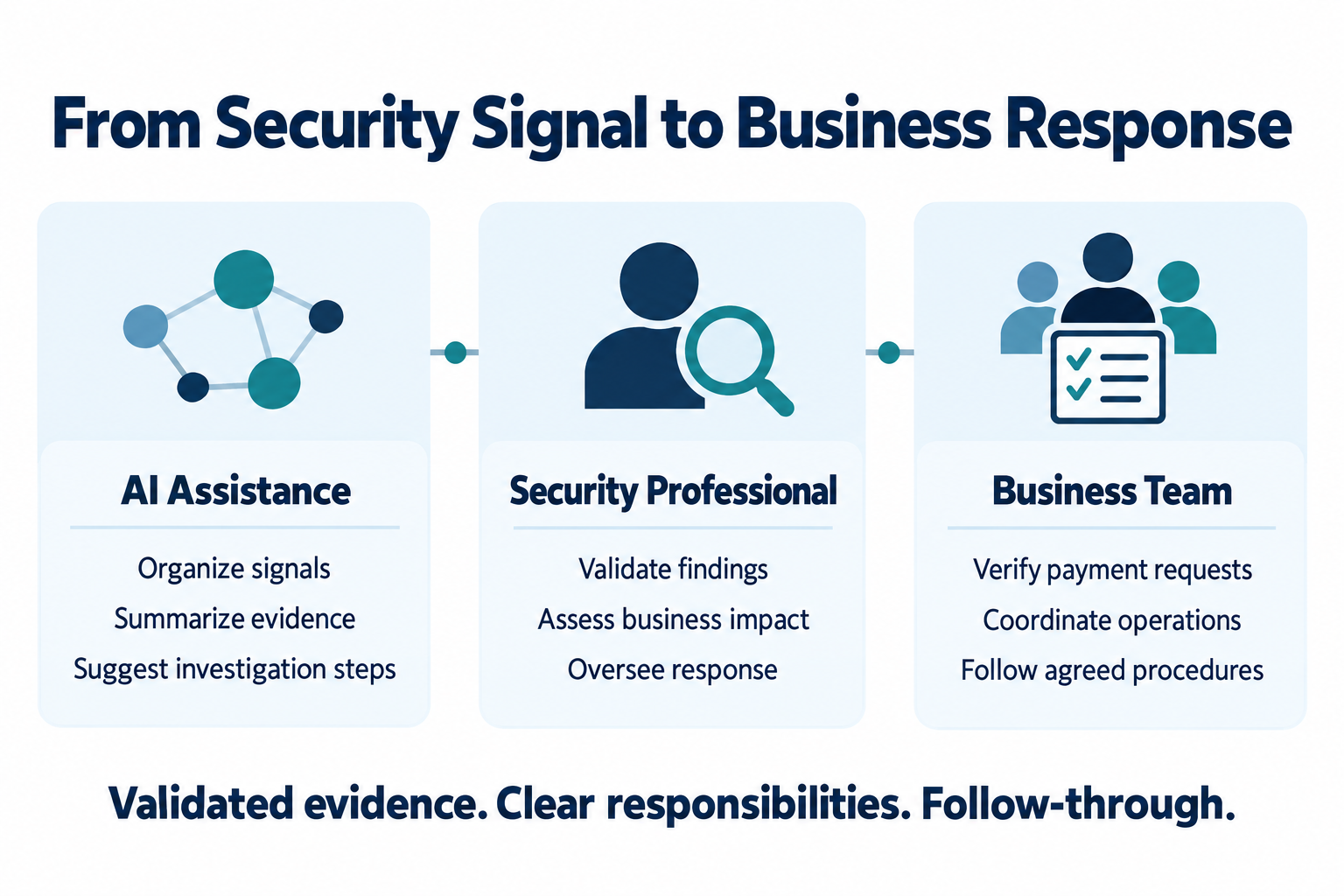
validated evidence, clear responsibilities, and follow-through.
What still requires human judgment?
AI can produce incorrect conclusions, omit important context, or overstate what the available evidence supports. A false positive flags legitimate activity as suspicious. A false negative misses activity that is actually malicious. Both affect the usefulness of a security service.
Microsoft’s Security Copilot application card describes limitations and the need to evaluate outputs. That supports a straightforward rule: treat AI-generated analysis as information to validate before relying on it for consequential decisions. Source: Microsoft.
Response decisions also have business consequences. Disconnecting a compromised workstation may be appropriate. Disabling an account used by an entire office could interrupt critical work. The team needs documented authority, escalation contacts, and a process for balancing containment with operational impact. Preauthorized automated actions can be useful when their scope and recovery steps are clear.
AI also introduces its own security considerations. Prompt injection occurs when malicious instructions embedded in content attempt to influence an AI system. Limit access, evaluate connected tools, and decide which actions need approval. Read AI Prompt Injection: What Businesses Need to Know and AI Prompt Laundering: A Business Security Risk for related examples.
What does this look like for a Bay Area business?
Imagine a 30-person construction company in San Rafael receiving an alert about a project manager’s account. The manager is traveling, so an unfamiliar sign-in location could have a legitimate explanation. At the same time, a subcontractor reports an unexpected request to change payment details.
An AI-assisted summary could organize the sequence of events. The security team still needs to confirm the manager’s activity, examine the available account evidence, assess possible compromise, and follow the response plan. Accounting needs to pause the payment change and verify it independently. Leadership needs a clear update about operational impact.
This is an illustrative scenario, not a PCC client case study. PCC’s recommendation is to connect technical investigation with business procedures before an incident occurs. The handoff between security, accounting, and leadership is part of the protection.
How should a business evaluate AI security claims?
Start with the problem you want to improve. Are important alerts being missed? Is investigation too slow? Is it unclear who responds after hours? Ask the provider to demonstrate that specific workflow using representative test data.
Ask what information the system receives, what it cannot see, and who verifies its conclusions. Confirm which actions are automatic, who authorizes disruptive changes, and how mistakes are reversed. Review access, retention, and data handling before connecting confidential business information.
Measure outcomes alongside effort. Useful measures include the time from alert to qualified review, the time to containment when needed, and whether test scenarios were correctly identified. Review missed cases and unnecessary interruptions, rather than celebrating the number of alerts processed. No single measure establishes overall protection.
A trial should have a defined scope, a responsible owner, and an agreed comparison with the current process. Include setup, licensing, review, and operating costs. These are PCC recommendations for evaluation, not claims of a guaranteed return.
What should small businesses put in place first?
Maintain device and account protection, appropriate access controls, timely patching, employee awareness, recoverable backups, and a documented incident response process. AI may support parts of that work, but it does not remove the need to do it.
PCC’s Cybersecurity services connect protective tools with monitoring and response. Our Managed IT Services support the maintenance and day-to-day technology practices those protections depend on. The starting point is understanding your current coverage and responsibilities, then evaluating where additional assistance would help.
Frequently asked questions
Can AI replace a cybersecurity professional?
AI can assist with analysis and defined tasks. It does not remove the need for accountable security professionals to validate conclusions, understand business context, and oversee response.
Does an AI security tool guarantee better protection?
No. Evaluate coverage, detection quality, configuration, and response ownership. An AI label alone does not establish effectiveness.
Is Microsoft 365 Copilot the same as Security Copilot?
No. They serve different purposes. Confirm the specific security product, connected services, access requirements, and current licensing before planning a deployment.
Should employees use a chatbot to check suspicious emails?
Employees should use the organization’s approved reporting process. Do not paste confidential messages into an unapproved tool or treat a chatbot’s verdict as permission to click or pay.
About Professional Computer Concepts
Professional Computer Concepts (PCC) is a trusted Managed IT and Cybersecurity provider serving the Bay Area for over 20 years. We help small and midsize businesses simplify their IT, strengthen security, and modernize operations. Explore our services:
Managed IT Services | Cybersecurity | Cloud Solutions
From PCC’s Desk
The question we want a business owner to ask is simple: if something suspicious happens, who will examine it and what happens next? Useful AI should make that answer clearer and the response more effective.
If you are unsure how your current security tools connect to a response process, contact PCC to review your coverage and identify the next practical improvement.