

The Windows 10 End of Life Challenge
Windows 10 is Reaching End of Life on October 14, 2025
No more security updates, no official support – what does this mean for your business?
- Security vulnerabilities will no longer be patched.
- Compliance risks for regulated industries.
- Software and hardware compatibility issues.
- Potential for increased downtime and cyber threats.
Choose your path wisely!
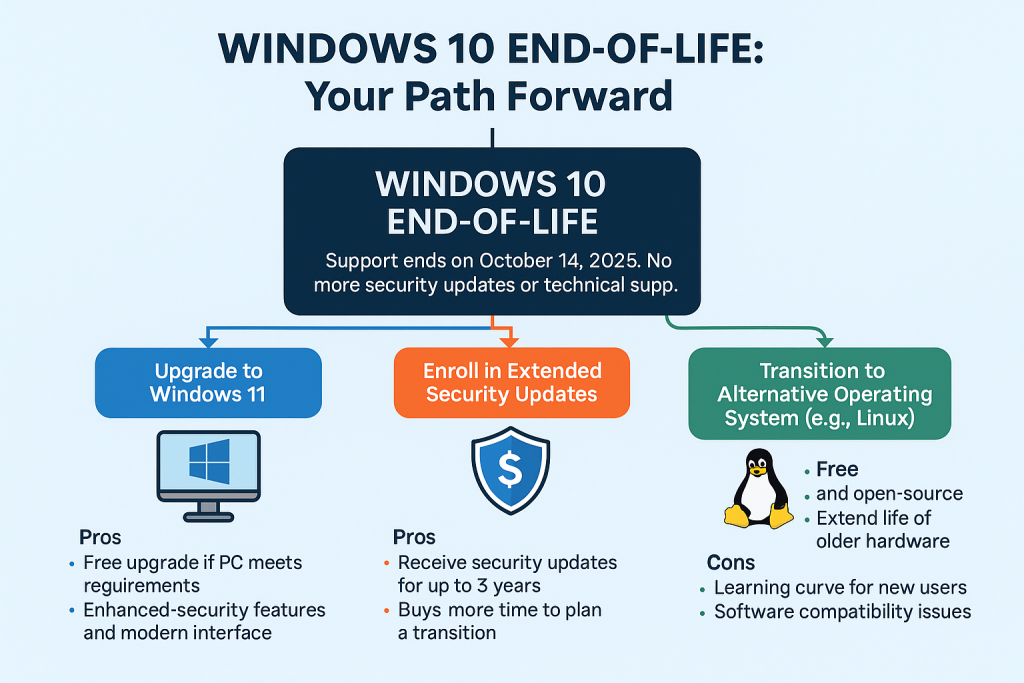
Choose Your Path: What Will You Do?
➤ Path 1: Do Nothing (Not Recommended)
Wait and see. Stretch things out. Hope for the best.
The risks:
- Your endpoints become easy targets for cybercriminals.
- Software vendors stop supporting Windows 10.
- Insurance claims and compliance audits may be denied or flagged.
- Your team wastes time fighting avoidable tech issues.
Time will not slow down—and neither will the threats.
➤ Path 2: Pay for Extended Security Updates (Short-Term Fix)
Microsoft will offer Extended Security Updates (ESUs) for Windows 10—but only to those on certain editions and with added cost.
Pros:
- Buys time if you’re waiting on hardware upgrades or app compatibility.
Cons:
- It’s a temporary patch, not a solution.
- Expensive, and only available for up to three years (2028 max).
- Doesn’t address other performance and productivity limitations.
This is a “bandage,” not a cure.
➤ Path 3: Upgrade to Windows 11 (Recommended for Most)
Future-ready, secure, and optimized for modern work.
Benefits:
- Ongoing support and security updates
- Enhanced productivity and security features
- Compatibility with the latest hardware and cloud services
Challenges:
- May require new hardware (not all systems meet Windows 11 requirements)
- Some employee training or adjustment may be needed
This is the path that strengthens your foundation.
Time Is Running Out: What That Really Means
October 2025 might seem far away—until it isn’t. Between evaluating hardware, budgeting for upgrades, testing software compatibility, and scheduling deployments, waiting until next year means you’re already behind.
The closer we get to the deadline:
- The harder it will be to source compatible hardware
- The more expensive support becomes
- The greater the pressure on internal teams and IT providers
What Should Your Business Do Next?
At Professional Computer Concepts, we help businesses plan and execute the transition off Windows 10 without the stress. We assess your environment, identify your upgrade path, and handle the rollout—on your timeline, before the deadline.
Whether you need help evaluating device compatibility, rolling out Windows 11, or managing a hybrid environment, we’re here to guide you.
More Resources:
- Windows 10 End of Life: Ignoring It Isn’t an Option
- Prepare for the Future: Windows 10 End of Life and Beyond
- Preparing for Windows 10 End of Life: Why It Matters
- Windows 10 End of Life: Critical Information for Businesses
- Windows 10 End-of-Support Risk & Options Guide

Don’t wait until you’re out of time.