

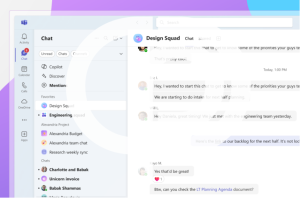
Microsoft has launched the new chat and channels experience in Teams, and it’s a big step forward for usability. With more focus and less friction, this update is designed to help you stay organized, cut through the clutter, and keep conversations flowing. Whether you rely on Teams for internal communication, client collaboration, or project management, these changes are worth exploring.
Everything in One Place
One of the biggest updates is the new combined Chat view, which brings all your communication—Favorites (formerly Pinned), chats, and Teams channels—into a single, streamlined list. No more bouncing between tabs or wondering where to look.

You can switch between views by navigating to:
Settings > Chats and channels > Viewing chats, teams, and channels
From there, choose either Combined or Separate, depending on your preference.
Want to explore even more Teams features? See how Voice Isolation improves call clarity.
Smarter Filters to Stay Focused
We all miss messages now and then—but Teams is making it harder to fall behind. With new filtering options, you can now:
-
Select Unread to quickly view every unread message
-
Filter by Chats or Channels for a more focused view
-
Use the Mentions tab to instantly see every message where you were tagged
These new filters make it easier to keep up with what matters—and clear out what doesn’t.
Organize with Custom Sections
You’re no longer limited to just pinning favorites. Now, you can create your own custom sections to group important chats and channels however you like. Just go to New items > New section, give it a name, and drag in what you need. Want a section for Projects? Clients? Marketing? It’s all possible.
Looking for more ways to make Teams work for your business? Our Microsoft 365 services can help your team stay productive and secure.
Tailor Your Experience
With the new chat and channels experience in Teams, you’re in control. From previewing messages to choosing how your layout appears, you can adjust the interface to match your personal workflow. Find all customization options under:
Settings > Chats and channels
Whether you prefer an all-in-one view or want to keep chats and channels separate, Microsoft gives you the tools to adapt, without sacrificing productivity.
Fr more tips and tricks on how to get started, read this blog.
How PCC Helps You Get the Most from Microsoft Teams
At Professional Computer Concepts, we help businesses make the most of their Microsoft 365 tools, including Teams. When Microsoft rolls out updates like the new chat and channels experience in Teams, we don’t just inform you—we help you implement the changes effectively.
We specialize in helping small and mid-sized businesses get real value from Microsoft 365 by offering:
-
Microsoft Teams configuration and training
-
User account and license management
-
Microsoft 365 security and compliance support
-
Integration with OneDrive, SharePoint, and collaboration tools
-
Strategic IT planning through our vCIO service
In addition to Microsoft 365 expertise, we also offer full-service managed IT and cybersecurity:
-
24/7 IT support and remote monitoring
-
Phishing awareness training and simulation
-
Backup and disaster recovery
We make sure your tools support your business—not slow it down.
Let’s talk about how to streamline your tech, improve collaboration, and reduce risks. Contact us today.
Final Thoughts
The new chat and channels experience in Teams is a thoughtful update that simplifies collaboration without sacrificing flexibility. Whether you’re leading a team or managing multiple projects, the ability to organize, filter, and customize Teams will help you stay focused and responsive.
Need help rolling this out across your business? PCC is here to guide you—from strategy to support.