
Ever rushed through your inbox, clicked a link that looked familiar, and only later realized something was off? Maybe the site loaded slowly, asked for your login again, or just felt…wrong.
You might have landed on a lookalike domain, a fake website designed to closely resemble a legitimate one. And in the rush of daily tasks, it’s easier to fall for than you might think.
Cybercriminals know we rely on quick glances, especially when we trust the brand or person the email claims to be from. That’s what makes lookalike domains so dangerous: they exploit how fast we move and how much we trust. But once you know what to look for, you can spot the tricks and protect yourself—and your business—from a serious breach.
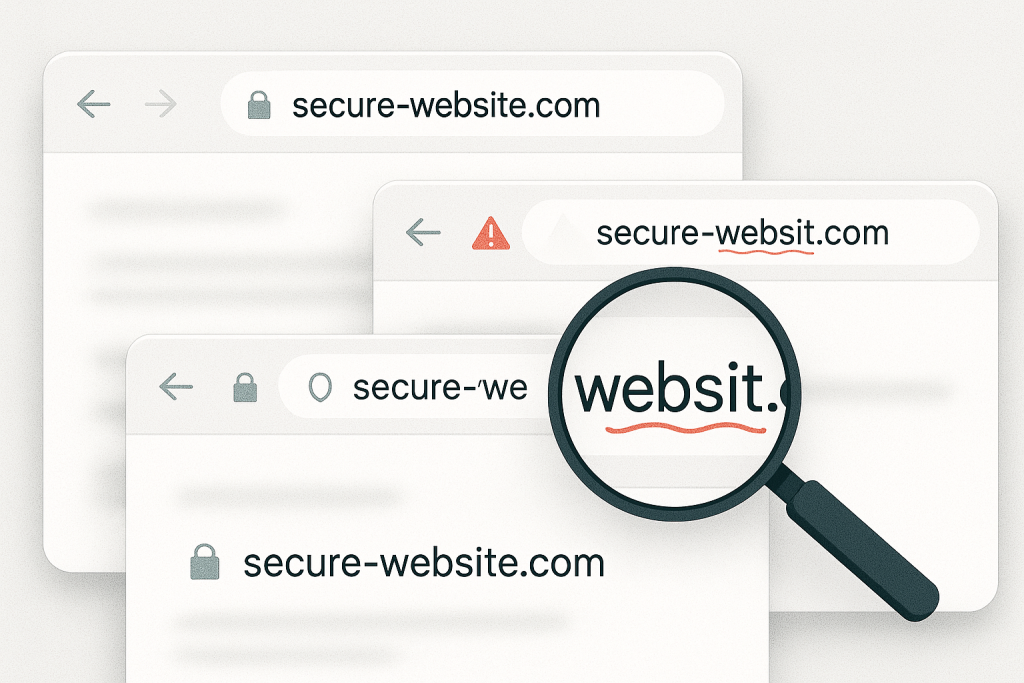
Businesses are frequently targeted with phishing emails containing lookalike domains.
What Are Lookalike Domains?
Lookalike domains are web addresses intentionally designed to mimic the appearance of trusted domains. Attackers register them with subtle variations by swapping a letter, adding a dash, or using a different top-level domain (like .co instead of .com)—to deceive users into thinking they’re visiting a legitimate site.
For example:
-
yourcompany.com→yourcornpany.com(replacing “m” with “rn”) -
paypal.com→paypa1.com(replacing “l” with the number 1) -
microsoft.com→micros0ft-security.com(adding a security-themed subdomain with a zero)
These domains are then used to host phishing websites, steal credentials, or install malware. In many cases, they’re paired with spoofed emails to complete the illusion.
💡 Did You Know?
More than 70% of phishing websites use lookalike domains to deceive users into giving up credentials or personal data.
Why Lookalike Domains Work So Well
The success of lookalike domains lies in how people interact with digital content. Most of us don’t examine URLs character by character—we glance and click, especially if the message looks urgent or familiar.
Cybercriminals take advantage of this. They carefully craft domains that are just close enough to fool the eye but still different enough to bypass domain ownership or trademark protections. Combined with emails that sound official and look professional, these attacks can trick even cautious users.
Sometimes the difference is as small as one extra letter or a visual similarity between characters. And on mobile devices, where URLs are often truncated, it’s even harder to tell something’s wrong.
💡 Did You Know?
A 2023 study found that users clicked on phishing links containing lookalike domains 47% more often than generic scam links—because the domain appeared to be trusted.
Real-World Example
Let’s say your company regularly works with QuickBooks. You receive an email saying “Your invoice is ready,” with a link to view it.
The link looks like this:https://quickbooks.invoices-support.com
At first glance, it seems legitimate. But it’s actually a lookalike domain owned by a threat actor.
The real QuickBooks domain is intuit.com. The fake domain uses familiar branding in a misleading way—by placing “quickbooks” at the beginning to trick users into believing it’s part of the real thing.
Clicking that link leads to a fake login page that captures your credentials, or worse, initiates a download of malicious files.
How to Spot Lookalike Domains
Spotting a lookalike domain starts with slowing down and paying attention. Here’s what to look for:
-
Domains with misspelled brand names or swapped characters (like “g00gle” instead of “google”)
-
URLs that use dashes, extra words, or numbers to appear more official (like
-login,-verify, or-secure) -
Top-level domains that are close but not correct (
.co,.biz,.supportinstead of.com) -
Domains that look legitimate but are not owned by the brand (check domain ownership with tools like WHOIS)
When in doubt, don’t click the link—navigate to the site directly by typing the address in your browser.
💡 Did You Know?
In 2022 alone, over 13,000 new lookalike domains were registered every day—many targeting banking, healthcare, and business apps.
What to Do If You Spot One
If you recognize a lookalike domain, don’t engage. Don’t click, download, or enter any information. Report the message to your IT team immediately and notify others who might also be targeted.
If someone in your organization has already interacted with the site, your IT provider should:
-
Change potentially compromised passwords
-
Check for unauthorized logins or access attempts
-
Scan for malware or keyloggers on the user’s machine
How PCC Can Help
At Professional Computer Concepts, we help your team go beyond passive awareness. We teach people how to recognize threats like lookalike domains in the real world.
Our managed cybersecurity services include:
-
Phishing simulations featuring real lookalike domain scenarios
-
EDR, MDR, PAM, and more to ensure your endpoints stay secure
We believe your team doesn’t just need tools—they need the insight and confidence to use them well.
Want to Learn More?
Explore more helpful resources:
Final Thoughts
Lookalike domains work because they don’t try to break your systems—they try to fool your eyes. And in a fast-paced world where most of us scan before we read, that’s often enough.
The good news is, with a little training and a lot of awareness, these scams become much easier to spot. Teach your team to look closer, slow down, and verify before they click—and you’ll stop many phishing attempts in their tracks.
Need help building a security-first culture?
Let’s talk.