
Email scams are more sophisticated than ever, and cybercriminals are constantly finding new ways to trick unsuspecting victims. Spotting phony emails is getting more and more difficult, and while spam filters help block many fraudulent messages, they don’t catch everything. Understanding the warning signs of phishing and scam emails can help you stay ahead of the threats.
Read our related blog: Phishing: What You Need to Know
Why Email Scams Are a Growing Threat
According to recent cybersecurity reports, phishing attacks remain one of the top methods cybercriminals use to steal personal and business information. Whether they’re trying to gain access to your accounts, trick you into downloading malware, or steal sensitive data, scammers use email as a primary attack vector. Being able to recognize these scams can protect you from financial loss, identity theft, or a compromised business network.
How to Identify Email Scams
Beware of Urgent or Threatening Messages
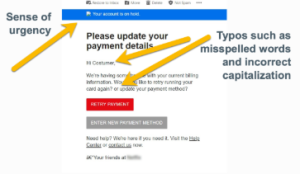
Phishing emails often create a sense of urgency to pressure you into acting quickly. Messages claiming your account will be closed, your payment didn’t go through, or that you need to verify your identity immediately are common red flags. If you receive an email urging you to click a link or provide sensitive information right away, stop and verify its authenticity first.
Scrutinize the Sender’s Email Address
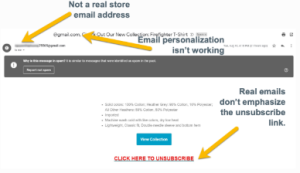 Just because an email looks like it’s from a legitimate company doesn’t mean it is. Always check the sender’s address carefully. Scammers often use addresses that mimic real companies but contain small discrepancies, such as:
- Example of a real email: [email protected]
- Example of a scam email: [email protected]
If the email address looks off, don’t trust it.
Use Caution: Many scammers rely on free email providers like Gmail (@gmail.com), Hotmail (@hotmail.com), and Yahoo (@yahoo.com). If you receive a request for money, account access, or sensitive information from an unfamiliar sender using one of these addresses, proceed with caution.
Hover Over Links Before Clicking
One of the easiest ways to spot a phishing attempt is by checking the links in the email. Hover your mouse over any link (without clicking) to see where it actually leads. If the URL looks suspicious, contains typos, or redirects you to an unfamiliar domain, don’t click it. Shortened links, such as those using bit.ly, can also obscure the true destination.
Never Share Personal Information via Email
Legitimate companies will never ask for sensitive details—such as passwords, Social Security numbers, or financial account information—via email. If you receive a request for personal data, it’s almost certainly a scam. When in doubt, contact the company directly using a verified phone number or website.
Watch for Poor Grammar and Spelling Errors
 Professional companies take the time to craft well-written emails. Scam emails, on the other hand, often contain awkward phrasing, excessive typos, or incorrect capitalization. If an email from a well-known brand seems poorly written, it’s likely a scam.
Don’t Open Unexpected Attachments
Malicious attachments are a common method for spreading malware or ransomware. If you receive an unexpected attachment, especially from an unknown sender, do not open it. Even if it appears to be from a trusted contact, verify with them directly before downloading anything.
Keep Your Security Software Updated
Having up-to-date security software is one of the best ways to protect your devices from cyber threats. Many security tools can detect phishing attempts and prevent malicious attachments or links from causing harm. If you suspect you’ve clicked on a fraudulent email, run a security scan immediately.
Check out our Phishing Guide to learn more about phishing and to test your phishing knowledge: Ultimate Phishing Guide
What to Do If You Receive a Suspicious Email
- Do not click on any links or download attachments.
- Report the email to your IT team or your email provider.
- Report gmail account abuse to Gmail Help.
- Mark it as spam or phishing in your email client.
- If you believe your account has been compromised, change your password immediately and enable multi-factor authentication (MFA).
Stay Informed and Stay Secure with Professional Computer Concepts
Cybercriminals are always evolving their tactics, making it essential to stay informed and proactive. That’s where Professional Computer Concepts comes in.
As a trusted Managed IT and Cybersecurity provider, we help businesses protect themselves against phishing attacks, email scams, and other cyber threats. Our Managed Detection and Response (MDR) solutions, advanced email security tools, and Security Awareness Training (SAT) empower businesses to defend against evolving cyber risks.
With proactive monitoring, phishing simulations, and expert support, we help you stop threats before they cause harm. If your business is ready to strengthen its cybersecurity posture and minimize risks, contact us today to learn how we can help.