

BART’s September 2025 Outage: Computer Glitch Halts Trains and Highlights IT Maintenance Lessons
Background: Systemwide Train Shutdown in September 2025

“Managed patching isn’t just about staying up to date — it’s about staying in control. We make sure every update is tested, timed, and aligned with your business needs.” — Professional Computer Concepts
On the morning of September 5, 2025, Bay Area Rapid Transit (BART) was hit by a systemwide train outage during peak commute hours. Starting around 4:30 a.m., an issue with BART’s computer systems prevented any trains from launching service. By the time commuters arrived for their morning rides, stations were closed off with caution tape and “No Train Service” notices as the entire network remained shut down. Full service did not resume until about 11:45 a.m., after nearly seven hours of downtime. Limited service within the East Bay was restored by ~9:30 a.m., but transbay routes (San Francisco and Peninsula stations) stayed offline until just before noon. The result was a chaotic Friday commute: thousands of riders were left scrambling for alternatives like buses, ferries, carpools and driving, causing crowding and traffic backups on bridge routes. (On a typical weekday, BART carries on the order of 165,000–175,000 passengers, underscoring the scale of impact from a full shutdown.) San Francisco’s Muni transit agency even warned of delays that morning, as many of its own employees rely on BART to get into the city.
When clients ask, “Doesn’t Windows update on its own?”, the recent BART outage is a powerful reminder of why managed patching is essential. This wasn’t just a transit disruption — it was a case study in what happens when critical system updates go wrong. Managed patching isn’t just about applying updates — it’s about applying the right ones, at the right time, with oversight and testing to prevent exactly this kind of systemwide failure.
Cause: Computer Equipment Failure After a Network Upgrade
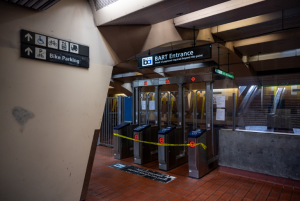
Caution tape blocks the fare gate entrance to a San Francisco BART station during the Sept. 5, 2025 systemwide shutdown. All trains were halted for hours due to a computer equipment failure following an overnight network upgrade. Source: sfchronicle.com
BART officials traced the September outage to a technical glitch during an overnight network upgrade. In a service advisory, BART confirmed the disruption occurred because of “a computer equipment problem following overnight network upgrade work.” The maintenance that night was part of an ongoing multi-year project to modernize BART’s aging communications infrastructure – replacing and upgrading network switches, routers, and other computer systems that control train operations. The agency performs this upgrade work incrementally during the hours BART is closed each night (roughly 1 a.m. to 5 a.m.), rather than all at once, since it’s not a one-night job. In this case, something in the latest update triggered a problem preventing all of our communication systems from coming online when morning service was supposed to start. In essence, the central computer system that dispatches and monitors trains could not boot up after the network changes, so BART had no way to run trains until the issue was resolved.
BART has not yet publicly identified the exact root cause of the failure. “We’re going to find out what went wrong,” BART spokesperson Alicia Trost assured reporters on the day of the incident. The agency immediately launched an investigation into why the upgrade crippled the communication network, and as of that evening, officials said they were still diagnosing the specifics of the glitch. Notably, BART stated that this September 5 outage was unrelated to the May 9 systemwide outage earlier in the year.
Impact on Service and Commuters
The service impact was immediate and systemwide. BART is the Bay Area’s backbone rail system connecting San Francisco with surrounding counties, so a complete shutdown during the Friday morning rush created a ripple effect across the region. All 50+ stations were closed for much of the morning. Trains were literally kept in yards or held at start points because the operations control center couldn’t safely dispatch them without the computer system. It took BART’s tech teams several hours to restore the communications network and reboot train control. By 9:30 a.m., the agency was able to run a limited service on three lines in the East Bay. However, no trains could run through the Transbay Tube to San Francisco or down the Peninsula until the entire system was brought back online just before 12 p.m. Even then, residual delays persisted as operations gradually normalized.
Thousands of commuters were left to find alternate transportation. BART urged riders via alerts to “seek alternative means of transportation,” providing an online map of other transit options during the outage. East Bay buses and ferries quickly filled to capacity with displaced BART riders, and traffic on bridges into San Francisco clogged early. AC Transit reported packed buses at transit hubs; some would-be BART passengers gave up after seeing long lines. The outage even impacted Muni in San Francisco as many operators rely on BART to get to work. All told, this disruption snarled the end of the work week for a huge swath of the Bay Area public. BART officials acknowledged the hardship, with Trost stating, “We know this is disruptive to thousands of people… it ruins our brand… reliability [is critical], and we have to be there every day.”
Official Response and Statements
BART’s leadership and communications team were quick to issue public updates and apologies as the situation unfolded. At 5:30 a.m., BART sent out an initial alert about a “systemwide computer equipment failure” that was preventing all trains from dispatching. As technicians worked to solve the problem, the agency provided status updates through email, social media, and its website. Board member Robert “Bob” Powers and BART managers coordinated the phased service restoration and kept the media informed once partial service could be resumed in the East Bay after 9:30 a.m. By 11:45 a.m., when full service was finally restored, BART published a detailed online advisory explaining what happened and promising a thorough investigation.
In that statement, BART reiterated that the failure occurred after an overnight network upgrade to its computer systems and emphasized that this upgrade work is crucial infrastructure modernization. They noted that the project involves continuous nightly work on the system’s communications network and that “something related to this upgrade work triggered a problem preventing all of our communication systems to come online.” BART assured riders that engineers were “investigating exactly what went wrong” to prevent a repeat incident.
Trost stressed that while the timing was unfortunate, the overnight maintenance is part of needed improvements: “It’s a massive ongoing project… part of rebuilding BART, which is a 50-plus-year-old system. We don’t just work on it one night a week… It’s unfortunate – absolutely. We’re gonna find out what went wrong.” She also made it clear that Friday’s outage was not related to the earlier May computer failure or other recent disruptions, calling it a distinct incident linked to the network upgrade effort.
Managed Patching: What BART’s IT Outage Teaches Us
When clients ask, “Doesn’t Windows update on its own?”, the BART outage offers a real-world answer. This is exactly why managed patching matters whether for critical infrastructure or for your business.
Curated Patching Prevents Catastrophe
BART’s experience shows why updates should be curated and not blindly applied. In managed IT services, managed patching means updates are tested, validated, scheduled, and monitored. This proactive strategy helps avoid the risk of deploying untested or incompatible updates that can take down entire systems. Without oversight, automatic updates can wreak havoc.
Delaying or Holding Back Problematic Patches
A key benefit of managed patching is the ability to delay updates when necessary. Just because a patch is released doesn’t mean it’s safe or compatible with every environment. Waiting a few days allows time to see if early adopters report issues. Businesses relying on managed patching can avoid being the guinea pigs for updates that may break mission-critical systems.
Off-Hours Scheduling Isn’t Enough Without Oversight
BART scheduled their update during off-hours, but the failure still occurred. Managed patching doesn’t stop at timing — it requires testing and a rollback plan. Managed service providers don’t just install patches at night; they monitor them, test in staging environments, and prepare to intervene immediately if something goes wrong.
Automatic Updates Without Management Are Risky
Auto-updates can seem convenient, but for critical systems, they’re a liability. With managed patching, updates are deployed with caution and control. There’s always someone watching. If BART had a rollback mechanism or deeper pre-deployment checks, they might have prevented the outage entirely.
Communication and Contingency Plans
BART scrambled to update the public once the failure was in motion. In IT, that’s the equivalent of last-minute damage control. Managed patching is only one piece — the full puzzle includes contingency planning, backups, status alerts, and stakeholder communication. Every patch should be tied to a plan: what to do if it fails, who is notified, and how fast recovery can begin.
Final Thoughts: Why Managed Patching Shouldn’t Be Optional
The BART outage wasn’t just a transportation failure, it was a technology failure. And for anyone running a business with digital systems, it’s a cautionary tale. Managed patching is about doing updates the right way: with care, planning, testing, and support. At Professional Computer Concepts, we don’t just “let Windows update itself.” We manage patching. We monitor it. We delay it when needed. We test it. And we make sure your systems don’t crash before your day even begins.
Let’s talk about how managed patching can keep your business moving — even when everything else grinds to a halt.
About Professional Computer Concepts
Professional Computer Concepts (PCC) is a leading Managed IT and Cybersecurity provider serving small and mid-sized businesses across the Greater Bay Area for over two decades. We specialize in preventing downtime, securing systems, and helping businesses thrive with technology that just works.
Our approach to IT is proactive and that includes how we manage updates. We don’t rely on luck or auto-updates. We curate, test, and monitor patches to ensure your systems stay online and secure.
Our Services Include:
Managed IT Services – Proactive support with 24/7 monitoring, maintenance, and unlimited helpdesk access to prevent issues before they disrupt your business.
Managed Cybersecurity – End-to-end protection including managed patching, endpoint detection and response, phishing simulation, dark web monitoring, and password management.
Cloud Solutions – Secure, scalable environments that support remote work and ensure business continuity.
Virtual CIO (vCIO) Services – Strategic IT planning that aligns your technology with your business goals and budget.
At Professional Computer Concepts, we believe in doing IT right with strategy, accountability, and clear communication. Whether you’re protecting critical infrastructure or ensuring your employees can work without interruption, our managed patching and IT services keep your business on track.
Let’s talk about how we can help you stay secure and prepared no matter what.